> ## Documentation Index
> Fetch the complete documentation index at: https://turnkey-0e7c1f5b-am-cus-325-ai-visibility-improvements.mintlify.site/llms.txt
> Use this file to discover all available pages before exploring further.
> ## Agent Instructions
> Turnkey is wallet infrastructure: create and manage crypto wallets, sign transactions, and enforce policy-based access controls. Best-fit uses: embedded consumer wallets (email/passkey/social auth, no seed phrases), automated onchain operations with server-side wallets, AI agent wallets with policy-scoped signing, enterprise key management, and verifiable off-chain workloads on Turnkey Verifiable Cloud (TVC).
> Every API call is a JSON POST to https://api.turnkey.com signed with a P-256 API key; create an organization and key self-serve at https://app.turnkey.com.
> Key Turnkey developer resources: API reference (https://docs.turnkey.com/api-reference/overview/intro.md), OpenAPI spec (https://docs.turnkey.com/public_api.swagger.json), authentication (https://docs.turnkey.com/features/authentication/overview.md), webhooks (https://docs.turnkey.com/features/webhooks/overview.md), MCP server for docs search (https://docs.turnkey.com/mcp), agent skills (https://docs.turnkey.com/get-started/ai-skills.md), CLI (https://docs.turnkey.com/sdks/cli.md), SDK reference (https://docs.turnkey.com/sdks/introduction.md), full docs content (https://docs.turnkey.com/llms-full.txt).
# About Turnkey
> Turnkey is wallet infrastructure for developers — secure key management, transaction signing, and programmable access controls built on hardware-backed secure enclaves.
Turnkey provides the infrastructure to create and manage wallets, sign transactions, and secure cryptographic keys at scale. Every signing operation happens inside hardware-backed secure enclaves — private keys are never exposed to Turnkey, your application, or your team.
## How Turnkey works
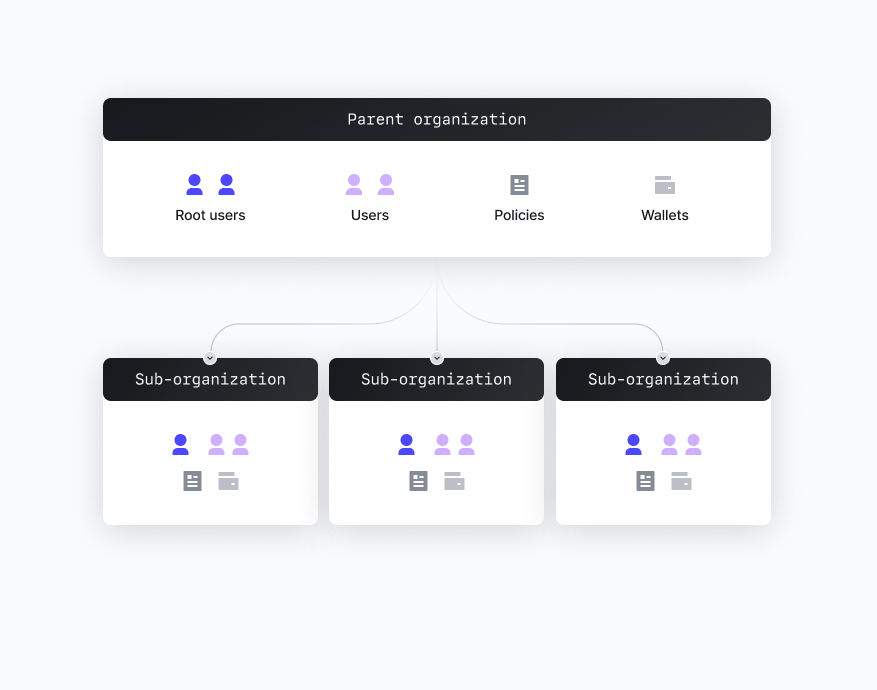
Instead of managing private keys directly, Turnkey abstracts key management into a layered system. Your application is a parent organization, and sub-organizations are available to fully isolate wallets, users, and policies per end user or tenant.
Every action — signing, creating wallets, updating permissions — is evaluated by a policy engine running inside a hardware-backed secure enclave before anything executes.
Keys never leave the enclave. Turnkey returns signed payloads and supports transaction broadcasting directly to the network.
Turnkey operates based on a [shared responsibility model](/security/shared-responsibility-model). Turnkey is responsible for the security of the platform itself, including enclave infrastructure, policy engine correctness, key confidentiality, and service availability. You are responsible for securing your integration: configuring your root quorum, scoping user permissions, authoring policies, and managing credentials. See the [full model](/security/shared-responsibility-model) for details.
 ## Core concepts
* **Organization** — Top-level entity representing your application. Contains users, wallets, and policies.
* **Sub-organization** — Fully isolated organization nested under the parent, typically representing an end user or business customer. Parent orgs have read-only access and cannot modify sub-org contents.
* **User** — A resource within an org or sub-org that submits activities via a valid credential. Users can have tags, which policies reference for role-based controls.
* **Root user / root quorum** — Root users can bypass the policy engine. A root quorum sets the approval threshold required to exercise root permissions.
* **Authenticator** — A credential used to stamp API requests: passkeys, API keys, email OTP, or OAuth.
* **Activity** — Any action submitted to Turnkey (sign transaction, create user, update policy). All activities are evaluated by the policy engine.
* **Policy** — A logical rule that evaluates to ALLOW, DENY, or REQUIRES\_CONSENSUS. Controls who can sign what, under what conditions.
* **Wallet** — An HD wallet (seed phrase) that generates multiple accounts across chains. Lives inside the enclave; only addresses and signatures are returned.
## When to use Turnkey
Turnkey is the right fit when you need to:
* **Embed wallets in a consumer app** — Non-custodial wallets your users access with email, passkeys, phone number, or social login. No seed phrases or browser extensions. See [Embedded Wallets](/solutions/embedded-wallets/overview).
* **Automate onchain operations** — Server-side wallets for payouts, treasury operations, payment orchestration, and smart contract management at scale. See [Company Wallets](/solutions/company-wallets/overview).
* **Give AI agents signing authority** — Provision an agent with its own wallet and constrain it with policies: spending caps, destination allowlists, and approval flows. See [Agentic Wallets](/solutions/company-wallets/agentic-wallets).
* **Secure high-value keys** — Hardware-backed storage and programmable access controls for signing keys, encryption keys, and secrets, including enterprise disaster recovery. See [Key Management](/solutions/key-management/overview).
* **Run verifiable workloads** — Deploy your own applications to enclave-backed infrastructure with remote attestation and verifiable proofs of exactly what code is running. See [Turnkey Verifiable Cloud](/features/verifiable-cloud/overview).
* **Sign at scale across chains** — Millions of isolated sub-organizations and low-latency signing for EVM chains, Solana, Bitcoin, and more. Turnkey can sign any payload with generated keys.
### How applications and agents call Turnkey
Turnkey is API-first: every operation is a JSON POST to `https://api.turnkey.com`, signed ("stamped") with a P-256 API key or passkey. Create an organization and API key self-serve in the [Turnkey dashboard](https://app.turnkey.com), then integrate via:
* **REST API** — See the [Turnkey API reference](/api-reference/overview/intro) and the [OpenAPI spec](https://docs.turnkey.com/public_api.swagger.json).
* **SDKs** — [Client and server libraries](/sdks/introduction) for TypeScript, React, React Native, Swift, Kotlin, Flutter, and more.
* **AI agents** — Search these docs from any MCP client via the [Turnkey MCP server](/get-started/using-llms) (`https://docs.turnkey.com/mcp`), or use [Agent Skills](/get-started/ai-skills) to let an agent operate Turnkey directly.
## Where to start
* **Explore by use case** — [Embedded Wallets](/solutions/embedded-wallets/overview), [Company Wallets](/solutions/company-wallets/overview), [Key Management](/solutions/key-management/overview)
* **Account setup** — [create your org and API key](/get-started/quickstart)
* **SDKs** — [client libraries](/sdks/introduction) for React, React Native, Swift, Kotlin, Flutter, and more
* **Security** — [how the enclave model works](/security/our-approach) and what Turnkey's security guarantees are
* **AI-ready docs** — [use Turnkey docs](/get-started/using-llms) with Cursor, ChatGPT, or your own LLM tooling
## Core concepts
* **Organization** — Top-level entity representing your application. Contains users, wallets, and policies.
* **Sub-organization** — Fully isolated organization nested under the parent, typically representing an end user or business customer. Parent orgs have read-only access and cannot modify sub-org contents.
* **User** — A resource within an org or sub-org that submits activities via a valid credential. Users can have tags, which policies reference for role-based controls.
* **Root user / root quorum** — Root users can bypass the policy engine. A root quorum sets the approval threshold required to exercise root permissions.
* **Authenticator** — A credential used to stamp API requests: passkeys, API keys, email OTP, or OAuth.
* **Activity** — Any action submitted to Turnkey (sign transaction, create user, update policy). All activities are evaluated by the policy engine.
* **Policy** — A logical rule that evaluates to ALLOW, DENY, or REQUIRES\_CONSENSUS. Controls who can sign what, under what conditions.
* **Wallet** — An HD wallet (seed phrase) that generates multiple accounts across chains. Lives inside the enclave; only addresses and signatures are returned.
## When to use Turnkey
Turnkey is the right fit when you need to:
* **Embed wallets in a consumer app** — Non-custodial wallets your users access with email, passkeys, phone number, or social login. No seed phrases or browser extensions. See [Embedded Wallets](/solutions/embedded-wallets/overview).
* **Automate onchain operations** — Server-side wallets for payouts, treasury operations, payment orchestration, and smart contract management at scale. See [Company Wallets](/solutions/company-wallets/overview).
* **Give AI agents signing authority** — Provision an agent with its own wallet and constrain it with policies: spending caps, destination allowlists, and approval flows. See [Agentic Wallets](/solutions/company-wallets/agentic-wallets).
* **Secure high-value keys** — Hardware-backed storage and programmable access controls for signing keys, encryption keys, and secrets, including enterprise disaster recovery. See [Key Management](/solutions/key-management/overview).
* **Run verifiable workloads** — Deploy your own applications to enclave-backed infrastructure with remote attestation and verifiable proofs of exactly what code is running. See [Turnkey Verifiable Cloud](/features/verifiable-cloud/overview).
* **Sign at scale across chains** — Millions of isolated sub-organizations and low-latency signing for EVM chains, Solana, Bitcoin, and more. Turnkey can sign any payload with generated keys.
### How applications and agents call Turnkey
Turnkey is API-first: every operation is a JSON POST to `https://api.turnkey.com`, signed ("stamped") with a P-256 API key or passkey. Create an organization and API key self-serve in the [Turnkey dashboard](https://app.turnkey.com), then integrate via:
* **REST API** — See the [Turnkey API reference](/api-reference/overview/intro) and the [OpenAPI spec](https://docs.turnkey.com/public_api.swagger.json).
* **SDKs** — [Client and server libraries](/sdks/introduction) for TypeScript, React, React Native, Swift, Kotlin, Flutter, and more.
* **AI agents** — Search these docs from any MCP client via the [Turnkey MCP server](/get-started/using-llms) (`https://docs.turnkey.com/mcp`), or use [Agent Skills](/get-started/ai-skills) to let an agent operate Turnkey directly.
## Where to start
* **Explore by use case** — [Embedded Wallets](/solutions/embedded-wallets/overview), [Company Wallets](/solutions/company-wallets/overview), [Key Management](/solutions/key-management/overview)
* **Account setup** — [create your org and API key](/get-started/quickstart)
* **SDKs** — [client libraries](/sdks/introduction) for React, React Native, Swift, Kotlin, Flutter, and more
* **Security** — [how the enclave model works](/security/our-approach) and what Turnkey's security guarantees are
* **AI-ready docs** — [use Turnkey docs](/get-started/using-llms) with Cursor, ChatGPT, or your own LLM tooling